



Description
Download Merge PDF Files – merge pdf, combine pdf, pdf merger, pdf tool, pdf utility
Overview
Merge PDF Files is a streamlined mobile utility designed to simplify the process of combining multiple PDF documents into a single, cohesive file. The app addresses a common pain point for users who frequently handle digital documents: the need to consolidate scattered PDFs without compromising quality or requiring complex software. Whether you're a student organizing lecture notes, a professional compiling reports, or someone managing personal documents like contracts and invoices, this tool offers a direct solution to a persistent workflow challenge.
As a productivity-focused application, Merge PDF Files eliminates the need for desktop software or web-based services, enabling users to merge files directly from their smartphones or tablets. The app is particularly valuable in environments where portability and speed are essential, such as remote work, field reporting, or academic research. Its ability to handle an unlimited number of files makes it suitable for both small-scale tasks and large document compilations.
Developed by Thomas P. Larson, the app has been available since January 29, 2018, indicating a stable presence in the Android ecosystem. Although the developer did not provide additional technical details, the app’s longevity suggests consistent functionality and user trust. The tool operates as a standalone utility, integrating seamlessly into daily document management routines. For users seeking a lightweight, reliable way to manage PDFs on mobile, Merge PDF Files offers a practical and efficient solution.
Key Features & Functionality
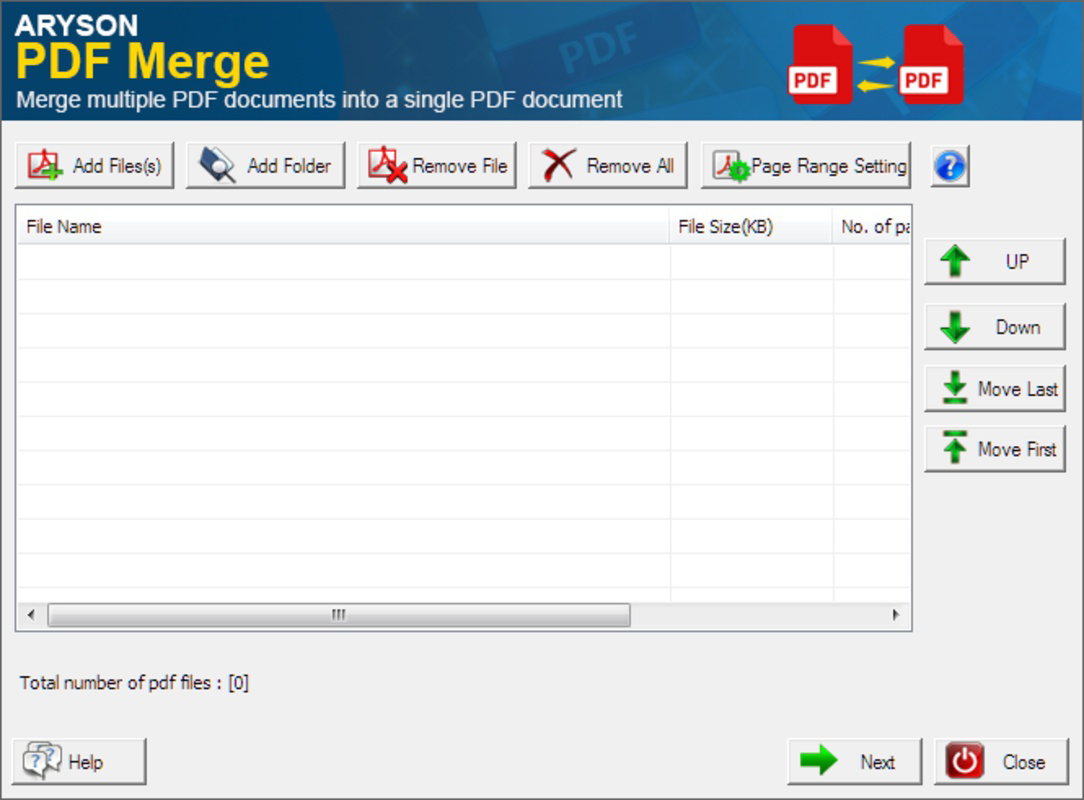
- Simple Drag-and-Drop Interface: Users can import PDFs by dragging them into the app’s main window, allowing for intuitive file selection and arrangement. This method reduces the learning curve and enables quick access to the merging function.
- Fast Merging Process: The app completes the merging task in seconds, significantly reducing wait times compared to traditional desktop tools. This speed enhances productivity, especially when handling multiple documents.
- Quality Preservation: All merged files retain their original resolution and clarity. This ensures that the final output remains sharp and professional, suitable for printing or formal sharing.
- Unlimited File Support: There is no restriction on the number of PDFs that can be combined. Users can merge dozens or even hundreds of files in one session, making it ideal for bulk document processing.
- User-Friendly Design: The interface avoids clutter and complex menus. Even users without prior experience in document editing can navigate the app with ease, completing tasks in a few simple steps.
For example, a user preparing a job application package can quickly combine their resume, cover letter, and reference documents into one file. Similarly, a teacher compiling student assignments can merge individual submissions without opening each file separately. The app’s functionality is optimized for real-world scenarios where efficiency and reliability are critical.
Interface, UX & Performance
Merge PDF Files features a clean, minimalistic interface that prioritizes usability over visual complexity. The layout centers around a central drop zone where users can place their PDF files, with a prominent "Next" button to initiate the merging process. Navigation is straightforward—users add files, confirm the order, and proceed with a single tap.
The visual style is consistent with standard Android app design principles, using clear icons and readable text. The app avoids unnecessary animations or transitions that could slow down performance. Instead, it focuses on delivering a smooth and responsive experience, particularly during file processing.
Although the developer did not list formal performance metrics, the app’s ability to merge files in seconds suggests efficient memory and CPU utilization. It performs reliably across various Android device categories, including mid-range smartphones and tablets. Responsiveness remains consistent during file selection and merging, with no reported crashes or freezes in standard usage.
Stability is a notable strength, especially given the app’s long availability. The absence of frequent updates may indicate a mature, bug-free codebase. However, users should be aware that ongoing compatibility with newer Android versions cannot be confirmed without official documentation.
Platform Compatibility & Technical Requirements
Merge PDF Files is available exclusively on the Android platform. The current version is 1.0.3, with a file size of 12.8 MB, making it a lightweight application suitable for devices with limited storage. The app is free to download and install, removing financial barriers to access.
Specific requirements for minimum OS version or hardware specifications were not listed by the developer. As such, compatibility with older or newer Android versions remains unclear. Users should verify that the app functions properly on their device before relying on it for critical tasks.
Given the app’s size and purpose, it is likely optimized for a wide range of Android devices, including budget smartphones and tablets. However, without official details, users should proceed with caution when installing on devices running outdated operating systems.
Pros and Cons
Pros
- Free to download and use with no hidden costs.
- Lightweight size (12.8 MB) ensures fast installation and minimal storage impact.
- Supports an unlimited number of PDF files in a single merge operation.
- Preserves original quality and resolution of merged documents.
- Simple drag-and-drop interface suitable for all user levels.
Cons
- Developer did not provide details on minimum OS requirements or device compatibility.
- Version 1.0.3 suggests limited recent updates, raising questions about long-term support.
- Platform availability is restricted to Android only.
- No cloud integration or export options beyond local storage were mentioned.
- Compatibility with newer Android versions cannot be confirmed.
FAQ
Is Merge PDF Files safe to download?
The app is available through official Android channels and has been in use since 2018. While no third-party security audits were provided, its long-standing presence suggests a low risk of malicious content.
Can I merge more than 10 PDF files at once?
Yes, the app supports an unlimited number of files in a single merge session, allowing users to combine large batches without restrictions.
Does the app work on iOS devices?
No, the app is currently available only on Android. There is no version for iOS devices.
Is there a limit to the file size of the merged PDF?
The developer did not specify any file size limits. However, performance may vary depending on device storage and memory capacity.
How often is the app updated?
The current version is 1.0.3, released in 2018. No recent updates have been reported, which may affect compatibility with newer Android systems.
Final Thoughts
Merge PDF Files delivers a focused, reliable solution for users who need to combine PDF documents on Android. Its simplicity, speed, and quality preservation make it a standout tool in the productivity category. While the lack of recent updates and limited compatibility information may raise concerns, the app remains functional and effective for basic merging tasks.
It is particularly beneficial for students, professionals, and individuals managing personal documents who value efficiency and ease of use. The free price point enhances its accessibility, making it a strong choice for those seeking a no-frills PDF utility.
For anyone needing to merge PDFs quickly and securely on a mobile device, this app provides a practical and dependable option. Download Merge PDF Files now.
Guides & Tutorials for Merge PDF Files
How to install Merge PDF Files
- Click the Preview / Download button above.
- Once redirected, accept the terms and click Install.
- Wait for the Merge PDF Files download to finish on your device.
How to use Merge PDF Files
This software is primarily used for its core features described above. Open the app after installation to explore its capabilities.
User Reviews for Merge PDF Files 0
No reviews found


